Quick Summary
Learn how to download Instagram Reel audio safely and efficiently to save trending music, voiceovers, or sound effects for personal projects. This guide covers step-by-step methods for mobile and desktop, best practices for quality and copyright compliance, and tips for organizing downloads. Explore our full blog for tools, updates, and expert advice on Instagram content creation.
Building a Personal Library of Instagram Reel Audio?
Audio is the backbone of Instagram Reels. The right sound can make a video go viral, convey emotions, or set the tone for storytelling. Unfortunately, Instagram does not allow users to download audio directly from Reels, which limits access for creators and enthusiasts who want offline use.
Learning how to download Instagram Reel audio opens opportunities to:
- Save trending songs for editing or remixes
- Collect sounds for personal projects or presentations
- Build a reference library of creative audio for inspiration
In this Snapdownloader guide, we’ll show you how to download audio from Instagram Reels step by step, explain the tools and methods, and highlight best practices to ensure safety, quality, and legal compliance.
Why Listen to Us?
We have extensive experience in social media tools, digital content creation, and safe download techniques, and thousands of users trust SnapDownloader for reliable, high-quality downloads of videos and audio from over 900 platforms.
Our advice focuses on methods that preserve audio quality, tools and apps that are safe, and guidelines that respect copyright and creator rights. With positive customer reviews praising our speed, ease of use, and support, even beginners can confidently download audio from Instagram Reels without compromising security or quality.
What Does it Mean to Download Instagram Reel Audio?
Downloading audio from Instagram Reels means saving the sound or music from a Reel as a separate audio file. Common formats include MP3, WAV, or M4A. This lets you use the audio offline, edit it, or add it to your own projects.
Instagram Reels feature many types of audio:
- Music from Instagram’s library: Popular songs used in Reels. Saving them lets you reuse trending tracks.
- Voiceovers or original sounds: Many creators add narration or unique audio. Downloading preserves their creativity.
- Sound effects or short loops: Quick clips that enhance videos with humor or drama.
- Trending audio clips: Viral sounds or memes used across multiple Reels.
Downloading audio allows you to:
- Listen offline: Access your favorite sounds without the internet.
- Edit or remix: Combine clips for your own content.
- Build a personal library: Keep a collection of sounds for future use.
- Maintain high quality: Trusted tools preserve audio fidelity for professional or social media content.
It is important to note that Instagram does not support direct audio downloads. To extract audio safely, use trusted tools and apps. This ensures high quality, avoids malware, and protects your device.
How to Download Instagram Reel Audio
Method 1: Using SnapDownloader
Step 1: Identify the Reel You Want
Begin by finding the specific Instagram Reel whose audio you want to save. Make sure the reel is public because private or restricted reels may not be retrievable reliably without proper permission.
Take a moment to:
- Note the creator’s username, which makes attribution easier if you plan to use or remix the audio.
- Listen to the Reel first, so you confirm you’re capturing the right sound segment, whether it’s a beat drop, voiceover, or loop.
Step 2: Copy the Reel Link
To extract audio, you first need to grab the URL of that Reel.
On mobile:
- Open the Instagram app and navigate to the Reel.
- Tap the three dots icon (…) on the Reel.
- Select “Copy Link” from the menu.
On desktop:
- Open Instagram in your browser.
- Click or play the Reel.
- Copy the full URL directly from the address bar.
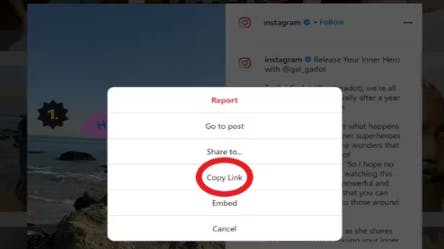
This link is what you’ll paste into SnapDownloader to initiate the extraction process.
Step 3: Choose a Trusted Tool
While there are many tools available, SnapDownloader is one of the most reliable for downloading high-fidelity audio from Instagram Reels. It supports multiple output formats, including MP3, WAV, and M4A, making it versatile for all types of audio needs.
Here are your options:
- Desktop (SnapDownloader): This is the recommended way. The desktop app supports bulk downloads, high-quality output, and offline use.
- Online extractors: Tools that work in your browser; useful if you don’t want to install software, but may have fewer options or lower quality.
- Mobile apps: Extract audio directly from your phone, though some may compress sound or insist on ads/permissions.
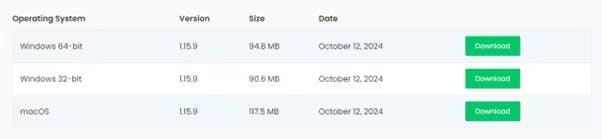
Download and install SnapDownloader by visiting the official website to ensure a secure, legitimate download.
Step 4: Paste the Link and Select Format
Once SnapDownloader is open:
- Paste the copied Instagram Reel link into the input box.
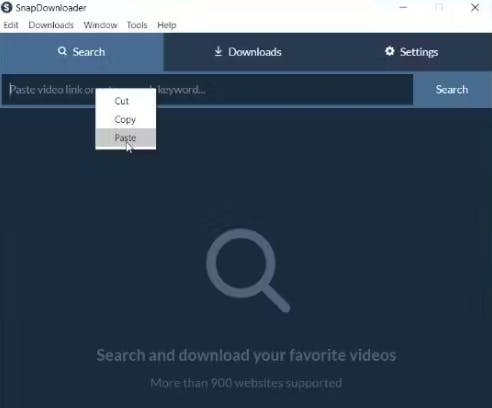
- Choose your output format: Video, Audio, GIF, etc.
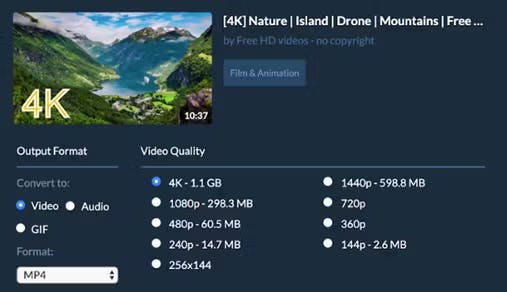
- Select desired audio quality, for the best results, opt for higher settings (for example, 320 kbps MP3 or uncompressed WAV).
- (Optional) You can trim and isolate just the part of the audio you need, maybe the chorus or a voice snippet.
Step 5: Download the Audio
After you’ve set your link and format:
- Hit Download or Extract Audio. SnapDownloader will process the Reel and pull out the audio file.
- Decide where to save the file:
- Create a dedicated folder named something like “Instagram Reel Audio.”
- Consider naming each file based on the Reel creator or the content, which makes future retrieval easier.
- If it’s important, back up your files to cloud storage so that your work isn’t lost if something happens to your device.
Method 2: Use an Online Audio Extractor (e.g., MP3stack)
- Copy the Instagram Reel link: Open the Reel in the Instagram app on your mobile device or on a desktop browser. Tap the Share button and select Copy Link to save the Reel URL.
- Visit MP3stack: Go to MP3stack.com. Using a trusted, official website ensures your downloads are safe and free from malware.
- Paste the link: Insert the copied URL into MP3stack’s input field.

- Choose Bitrate and Format: MP3stack allows you to select the audio format, usually MP3, and pick the bitrate, typically ranging from 128 kbps to 320 kbps. Higher bitrates preserve audio quality for editing or remixing.
- Preview the Audio (Optional): Some tools let you listen to the clip before downloading to confirm it’s the exact segment you want.
- Download the MP3: Click Download and save the audio file to your device. You can now use it offline for personal projects, remixes, or reference.
Pros:
- Flexible bitrate selection for better audio quality
- Good for quick access or occasional use
Cons:
- Dependent on the public accessibility of the Reel
- Quality may be limited by source / tool restrictions
- Risk of popups or ads (choose reputable sites)
Method 3: Use a Web-Based Instagram Audio Downloader (e.g., Hitube)
You can also download Instagram Reel audio using a browser-based tool like Hitube. Follow these steps:
- Copy the Reel Link: Open the Instagram app on your mobile device or access Instagram via a desktop browser. Locate the Reel whose audio you want to save, tap the three dots (…) on the video, and select Copy Link to save the Reel’s URL.
- Open Hitube: Go to Hitube.io’s Instagram audio downloader.
- Paste the URL: Insert the copied Reel link into the input field on Hitube’s page. This tells the tool exactly which Reel to extract audio from.
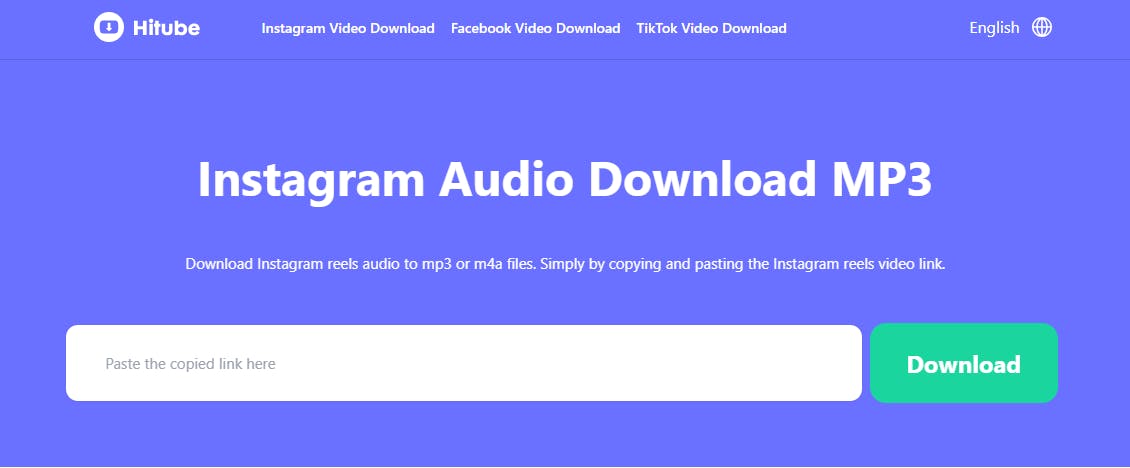
- Select Format: Choose your preferred audio format, either MP3 or M4A, depending on how you plan to use the file. MP3 is widely compatible, while M4A may retain slightly higher fidelity.
- Click Download: Hitube will process the Reel and generate your audio file. Once ready, save the file to your device.
Pros:
- No software installation needed
- Works on both desktop and mobile
- Quick and convenient for occasional audio downloads
Cons:
- Only works for public Reels
- Web-based extractors may inject ads or trackers, be cautious and use a trusted service
- Might not support batch downloads
Best Practices for Downloading Audio from Instagram Reels
1. Use Trusted Tools Only
Always use reputable apps like SnapDownloader. Third-party tools may carry risks such as malware, intrusive ads, or reduced audio quality. SnapDownloader ensures your downloads are safe, high-quality, and ad-free, giving you confidence when saving audio from Reels. Desktop versions are particularly reliable for bulk downloads and high-fidelity output.
2. Verify Audio Before Downloading
Before downloading, preview the Instagram Reel to confirm it contains the exact audio segment you want. This avoids unnecessary downloads and helps you capture the right part, whether it’s a trending beat, voiceover, or sound effect. SnapDownloader also offers trimming features so you can extract only the portion of audio you need, saving storage space.
3. Choose the Right Format and Quality
Selecting the correct audio format is essential. SnapDownloader supports formats such as MP3, WAV, and M4A, giving flexibility depending on your use case. For editing, remixing, or professional projects, always select higher bitrates (like 320 kbps for MP3 or uncompressed WAV) to preserve clarity and fidelity. Avoid low-quality downloads if the audio will be used in videos or presentations.
4. Organize Your Downloads
Keep your downloaded audio organized. Create dedicated folders on your computer or cloud storage labeled by creator name, Reel topic, or date. Rename files descriptively to make them easy to locate later. SnapDownloader allows you to batch download multiple Reels at once, so organizing files systematically prevents clutter and saves time in future projects.
5. Respect Copyright and Creator Rights
Always use your downloaded audio responsibly. Instagram Reels often feature music, voiceovers, or effects created by other users. Using audio without permission for commercial purposes or public sharing can infringe on copyright laws. For personal projects, remixes, or reference use, SnapDownloader makes the process easy while ensuring you credit the original creator when sharing publicly.
6. Backup Important Files
Backing up downloaded audio ensures you don’t lose valuable content. SnapDownloader lets you save files locally, but pairing this with cloud storage adds an extra layer of protection. This is particularly useful if you are building a library of trending sounds or preparing assets for recurring content projects.
7. Regularly Update Tools
Keeping SnapDownloader up to date ensures you always have access to the latest features, performance improvements, and bug fixes. Updates may include faster download speeds, support for new formats, or enhanced trimming and batch capabilities. This guarantees your downloads remain secure, reliable, and high-quality.
Take Your Instagram Reel Audio to the Next Level
Downloading audio from Instagram Reels unlocks new creative possibilities for content creators, marketers, and social media enthusiasts. By following this guide, you can safely save trending music, sound effects, voiceovers, and loops while maintaining high-quality audio perfect for editing, remixing, or personal projects. Using a trusted tool like SnapDownloader ensures that your downloads are fast, secure, and reliable, eliminating risks from unverified apps or online extractors.
Following best practices, organizing your files, respecting copyright, and choosing the right formats, helps you build a well-curated audio library that supports both inspiration and professional content creation.
Ready to get started? Download SnapDownloader today and start capturing your favorite Instagram Reel audio effortlessly. With SnapDownloader, you can create, remix, and share your projects confidently while keeping quality and security top of mind.